
Clear VPN Credentials in Windows
Use these steps to remove stored VPN credentials in Windows to help troubleshoot issues with connecting.
Steps:
1-Click on the Windows flag at the bottom left corner of your screen

2-Once the Start Menu opens, even though it isn’t immediately obvious, you are able to type anywhere to search. Type in “vpn” (without the quotes) and Windows should display the following. Click on “VPN Settings”

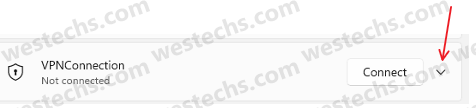
3-Find your VPN connection and click the small arrow next to it
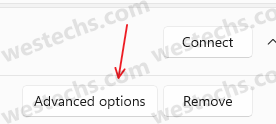
4-Click on “Advanced options”
5-Click on “Clear” next to “Clear sign-in info”. Look for a small checkmark to be displayed then try your VPN connection again.



 Westechs LLC
3001 W Loop 250 N
Suite C105-324
Midland, Texas 79705
(432) 242-2700 Midland
(432) 363-5200 Odessa
(888) 726-6222 Toll-Free
Privacy Policy | Careers | Service Status | Become a Vendor
Copyright 2026 Westechs LLC - All Rights Reserved
Westechs is licensed by the state of Texas for security services - License Number B20675